
In today’s digital world, your workspace is a reflection of your personality and productivity. Whether you’re a gamer, designer, student, or remote worker, one item that often gets overlooked is the mouse pad. But did you know that you can transform this everyday accessory into a customized piece of art? With custom sublimation mouse pads, you can combine functionality with personalization to create something truly unique.
In this blog, we’ll explore what sublimation is, why it’s perfect for mouse pads, and how to design your own.
What is Sublimation?
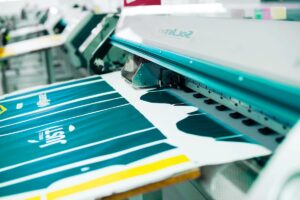
Sublimation printing is a process that uses heat to transfer dye directly into the surface of specially coated materials. Unlike traditional printing methods, sublimation bonds the ink into the fabric or polymer coating, making the design more durable, vibrant, and long-lasting.
When applied to mouse pads, this means you get:
- High-definition images
- No peeling or fading
- Smooth, professional finish
- Full-color, edge-to-edge printing
Why Choose Custom Sublimation Mouse Pads?
1. Personal Expression
From your favorite quote or photo to your company logo or artwork, a custom mouse pad lets you express yourself or your brand every time you sit down at your desk.
2. Perfect for Gifting or Branding
Custom mouse pads make excellent promotional items for businesses, gifts for friends, or merchandise for creators. They’re affordable, practical, and easy to personalize in bulk.
3. Durability
Thanks to the sublimation process, the design won’t crack, peel, or fade even with daily use. These mouse pads are built to last through long gaming sessions or workdays.
4. Smooth Tracking Surface
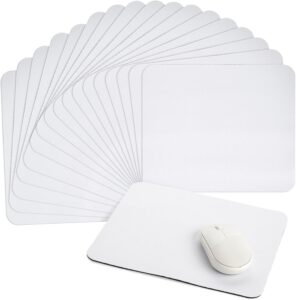
Most sublimated mouse pads are made from polyester fabric on top and rubber backing underneath, offering a smooth glide for your mouse and a non-slip grip on your desk.
How to Create a Custom Sublimation Mouse Pad
Here’s how you can design and order your own customized mouse pad:
1. Choose a Quality Blank Mouse Pad
Start with a sublimation-ready blank mouse pad. These typically have a white polyester top and a black rubber base, sized around 9.25" x 7.75" or larger for gaming pads.
2. Design Your Art
Use design software like Canva, Photoshop, or Illustrator to create your image. Make sure your resolution is at least 300 DPI for best print quality. Add bleed space to avoid cut-off edges.
3. Use a Sublimation Printer
If you're doing this at home, you’ll need a sublimation printer, sublimation ink, transfer paper, and a heat press. Print your design on sublimation paper, place it face-down on the mouse pad, and press with heat (around 400°F for 60 seconds).
4. Order from a Provider
Not into DIY? No problem. Many online shops and printing companies offer custom sublimation mouse pads. Simply upload your design, choose your size, and place your order.
Final Thoughts
A custom sublimation mouse pad is a subtle yet powerful way to enhance your space. Whether for personal use, corporate branding, or thoughtful gifting, this small accessory packs a big punch. With high-quality graphics, durability, and endless design possibilities, you're just one print away from creating something truly one-of-a-kind.
So go ahead — personalize your pad, and make every click count!

