
In today’s digital age, prolonged computer usage has become a daily routine for millions of people. Whether you're working from home, gaming, or browsing the web, your hands and wrists are constantly in motion—especially when using a mouse. Over time, this repetitive activity can lead to discomfort or even chronic conditions like carpal tunnel syndrome or repetitive strain injuries (RSI).
One popular solution often recommended is the ergonomic mouse pad, typically featuring a soft, gel or memory foam wrist rest. But this brings us to an important question: Do ergonomic mouse pads really reduce wrist pain, or are they just a placebo?
Let’s explore what the science and real-world experience say about these accessories.
What Is an Ergonomic Mouse Pad?
An ergonomic mouse pad is designed to promote a more natural hand and wrist position during mouse use. Most of these pads feature a built-in wrist rest, which is raised slightly above the pad's surface and made from materials like gel, memory foam, or silicone.
The idea is simple: by supporting the wrist and reducing the angle at which it bends, the pad can relieve pressure on tendons and nerves, potentially preventing or alleviating pain.
Understanding Wrist Pain and Computer Use
Wrist pain associated with mouse use is often caused by:
Poor wrist posture, such as bending the wrist upward or sideways
Continuous pressure on the wrist from hard surfaces
Lack of movement or breaks, leading to stiffness and fatigue
Overuse injuries like carpal tunnel syndrome
If you're spending hours in front of a computer with poor ergonomics, the risk of developing discomfort or injury increases significantly.
How Ergonomic Mouse Pads Help
-
Wrist Support
The primary benefit of ergonomic mouse pads is support. The built-in rest provides a cushion for your wrist, reducing the amount of pressure placed on the median nerve, which runs through the wrist and is commonly associated with carpal tunnel syndrome. -
Neutral Wrist Positioning
These pads are designed to keep your wrist in a neutral, straight position, rather than bent upward or sideways. This alignment reduces strain on your tendons and ligaments, which can minimize inflammation and discomfort over time. -
Reduced Friction and Pressure Points
A soft, cushioned surface eliminates the hard contact between your wrist and the desk. This reduces friction and potential pressure points that can cause irritation or exacerbate existing pain. -
Encouragement of Better Posture
While a mouse pad alone won’t fix poor posture, it can support better hand and arm alignment, especially when combined with an ergonomic chair and desk setup.
Let's take a look at this ergonomic mouse pad from MEIYEE HOUSEWARE FACTORY. It can not only be customized in various sizes and colors, but also has passed various tests and has various certificates.
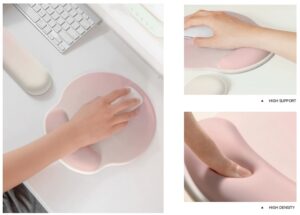
What Does the Research Say?
Scientific studies on ergonomic mouse pads are somewhat limited, but ergonomics experts generally support their use as part of an overall strategy to prevent repetitive strain injuries.
For example:
A study published in the journal Applied Ergonomics found that using wrist rests in combination with breaks significantly reduced muscle fatigue in the forearms.
Another research article from the Journal of Occupational Rehabilitation noted that ergonomic interventions, including wrist supports, led to a measurable decrease in work-related musculoskeletal disorders.
However, these benefits often depend on proper use. Poorly positioned wrist rests—or relying on them too heavily—can sometimes do more harm than good.
Common Mistakes to Avoid
While ergonomic mouse pads can be helpful, they must be used correctly to be effective:
❌ Resting Your Wrist All the Time
The wrist rest is meant to support your wrist during pauses, not while actively moving the mouse. Constant pressure during mouse movement can restrict blood flow and increase friction, causing more harm than good.
❌ Improper Height and Placement
If your wrist rest is too high or too low relative to your mouse, it can force your wrist into a bent position, defeating its purpose. Make sure the mouse and wrist rest are level with your elbow when your arm is relaxed at your side.
❌ Ignoring the Rest of Your Setup
Even the best mouse pad can’t compensate for a poor overall setup. Your chair, desk height, monitor position, and keyboard placement also play crucial roles in wrist comfort.
Tips for Maximizing Ergonomic Benefits
If you're considering an ergonomic mouse pad, here are some tips to get the most out of it:
Choose the right material: Gel and memory foam offer different firmness levels. Try both and see which one feels more natural.
Keep your arm relaxed: Your forearm should move the mouse, not just your wrist.
Take frequent breaks: Follow the 20-20-20 rule—every 20 minutes, take a 20-second break and look 20 feet away.
Pair it with other ergonomic tools: Consider an ergonomic mouse, a height-adjustable chair, or even a standing desk for a more complete solution.
So, Do Ergonomic Mouse Pads Really Reduce Wrist Pain?
Yes—when used correctly, ergonomic mouse pads can help reduce wrist pain, especially when they're part of a more comprehensive ergonomic setup. They support better wrist alignment, minimize pressure, and encourage healthier hand movements.
However, they are not a magic fix. They work best when combined with proper posture, frequent breaks, and ergonomic awareness. Relying solely on a wrist rest without addressing other factors may limit its effectiveness—or even cause new issues.

