
When building the ultimate gaming setup, most gamers focus on their rig’s specs, monitor refresh rate, and peripherals like keyboards and mice. But one often-overlooked component that can significantly impact performance is the mouse pad. Choosing the right mouse pad isn’t just about aesthetics — it can affect your precision, comfort, and overall gameplay. Here's how to pick the perfect mouse pad for your gaming needs.

1. Understand Your Play Style
The first step in choosing a mouse pad is understanding your gaming style. Are you a fast-paced FPS gamer who needs quick, sweeping movements? Or are you more of a strategy game player who relies on precise, controlled motions?
Low DPI players (common in FPS games) often benefit from large mouse pads that allow for broad arm movements.
High DPI players (common in MOBAs or RTS) may prefer smaller pads since their mouse movements are more wrist-based and minimal.
2. Choose the Right Surface: Speed vs. Control
Mouse pads generally come in two types of surfaces: speed and control.
- Speed pads have a smoother texture that reduces friction, offering quicker movements — ideal for fast-paced action games.
- Control pads provide a more textured surface, increasing friction and giving better stopping power for precise shots.
Some hybrid mouse pads aim to offer the best of both worlds, but test them if possible to find what suits your gameplay best.
3. Material Matters
Mouse pads are made from various materials, each with its own pros and cons:
- Cloth: The most common type, offering comfort and good balance between speed and control. They’re flexible and easy to roll up for portability.
- Hard plastic: Offers a faster glide and is easier to clean, but may wear down mouse feet faster.
- Aluminum or glass: Premium options with ultra-smooth surfaces, but they can be noisy and cold to the touch.
- Hybrid surfaces: Combine properties of cloth and hard pads, often offering a great balance for competitive gamers.
4. Size and Thickness
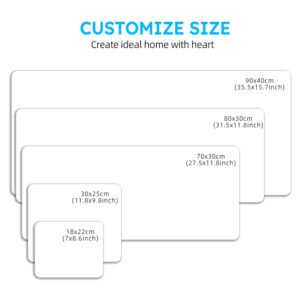
Mouse pads come in various sizes, from small (for minimal desk space) to extended versions that cover most of your desk.
- Small/Medium: Suitable for high DPI settings and confined spaces.
- Large/Extended: Great for low DPI gamers or those who want their keyboard and mouse on one surface.
Thickness also plays a role in comfort. Thicker pads offer more cushioning, which can reduce wrist fatigue during long sessions.
5. Extra Features to Consider
Today’s mouse pads often come with extra features:
- RGB lighting: Aesthetic add-on for those who love a colorful setup.
- Wireless charging: Some pads can charge your wireless mouse or phone.
- Anti-slip base: Ensures the pad stays firmly in place during intense gameplay.
Final Thoughts
A mouse pad may seem like a small piece of gear, but it can have a big impact on your gaming experience. By considering your play style, preferred surface texture, material, size, and bonus features, you can find a mouse pad that complements your setup and enhances your performance. Remember — the right mouse pad doesn’t just support your mouse, it supports your entire game.

