
In the world of gaming and office productivity, a good mouse pad is more than just a surface for your mouse—it's a foundational element of your setup. However, over time, mouse pads can accumulate spills, sweat, and scratches, which compromise their performance and hygiene. With a little care and attention, you can extend the life of your mouse pad and keep it in optimal condition. Here are some essential tips for maintenance.
1. Regular Cleaning
One of the most effective ways to maintain your mouse pad is through regular cleaning. Dust, dirt, and grime can build up over time, affecting both performance and aesthetics.
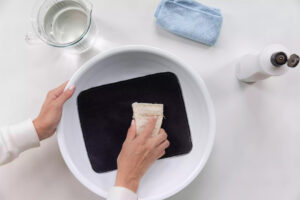
Cloth Mouse Pads
For cloth mouse pads, a gentle cleaning approach is best. Here’s how to do it:
- Remove Dust: Start by shaking out any dust or debris. You can use a soft brush or a vacuum cleaner with a brush attachment for this step.
- Wash: Fill a basin with warm water and add a mild detergent. Submerge the mouse pad and gently scrub it with a sponge or cloth. Avoid using abrasive cleaners that could damage the fabric. Rinse thoroughly and allow it to air dry flat—never wring it out or expose it to direct sunlight.
Hard Surface Mouse Pads
Hard surface mouse pads can often be wiped clean. Use a damp cloth with mild detergent to remove stains and grime. You can also use alcohol wipes for disinfecting, which is particularly useful if you’re concerned about hygiene.
2.Prevent Damage from Spills

Accidental spills can happen to anyone, and how you react will determine whether your mouse pad suffers permanent damage. If you spill something on your mouse pad:
- Act Quickly: Blot the spill immediately with a paper towel. Avoid rubbing, as this may push the liquid deeper into the material.
- Clean Properly: Follow the cleaning instructions for the material of your mouse pad (as mentioned above). If the spill is extensive, a thorough wash may be necessary.
3. Manage Sweat
If you’re gaming hard or working long hours, sweat can accumulate on your mouse pad, especially if it’s cloth. To manage this:
- Consider a Sweat-Resistant Mat: Some mouse pads come with moisture-wicking properties or are specifically designed to resist sweat. Consider this if you often engage in intense gaming sessions.
- Use a Surface Protector: You can also use thin fabric or a towel that you place over your mouse pad during intense sessions. This helps absorb sweat without compromising the mouse pad's functionality.
4. Store Properly
When not in use, how you store your mouse pad matters:
- Avoid Folding or Rolling: If your mouse pad is rigid, store it flat. For fabric mouse pads, avoid folding them as creases can damage the surface.
- Keep Away from Extreme Temperatures: Storing your mat in extreme heat or cold can warp it.

5. Monitor Wear and Tear
Lastly, keep an eye on the wear and tear of your mouse pad. If you notice significant fraying, scratches, or discoloration that affects performance, it might be time for a replacement.
Conclusion
Maintaining your mouse pad is essential for prolonging its life and ensuring peak performance. Regular cleaning, prompt attention to spills, careful management of sweat, proper storage, and awareness of wear will keep your mouse pad in prime condition. With a little effort, you can enjoy a smoother, more efficient workspace—whether you're battling it out in a game or tackling your daily tasks. A well-maintained mouse pad might just give you the edge you need!

