
When creating an efficient and comfortable workspace, a mouse pad might not be the first accessory that comes to mind. However, this seemingly insignificant little item can often bring significant improvements in daily productivity, comfort, and even wrist health. Whether you work in a traditional office, work from home, or choose a coworking space, a suitable mouse pad can make your operation smoother and your experience more stable. Next, we will introduce some high-quality mouse pads suitable for office scenarios and capable of improving daily productivity, focusing on comfort, build quality, and practical functions.
Why a Good Mouse Pad is Important
Before diving into our recommended list, let's understand why a mouse pad is crucial for office environments:
- Ergonomic Support: Prolonged sitting puts pressure on the wrists and forearms. Mouse pads with wrist supports can reduce fatigue and lower the risk of repetitive strain injuries.
Smoother and More Precise Control: High-quality mouse pads allow for more accurate mouse movement and more natural tracking. This is especially crucial for users who need to work with graphics software or large amounts of spreadsheet data.
-
More Durable: Office supplies are used frequently. Durable and wear-resistant mouse pads reduce the hassle of frequent replacements, offering long-term peace of mind.
-
Desktop protection and noise reduction: Mouse pads reduce scratches and wear, while also minimizing the noise from sliding friction.
Recommended mouse pads for office use:
1. Logitech Studio Series Mouse Pads
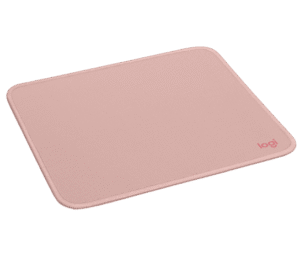
Suitable for: Users who prefer a minimalist style and prioritize smooth performance.
The Logitech Studio series mouse pads are known for their minimalist design and excellent surface performance. Their design emphasizes smooth tracking and is compatible with both optical and laser mice. They also feature a water-repellent surface and a non-slip rubber base, making them ideal for those who want a stable, reliable, and seamlessly integrated mouse into their office environment.
Advantages:
Soft surface, comfortable feel
Good non-slip rubber base
Uses more environmentally friendly materials
2.Kensington Duo Gel Mouse Pad with Wrist Support
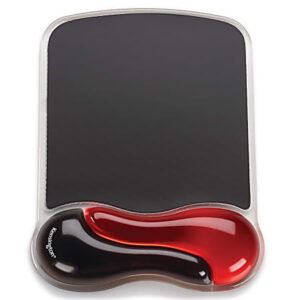
Suitable for: Users who require more ergonomic support.
This mouse pad features a built-in gel wrist support that conforms to the wrist's curve, providing greater comfort for extended work sessions. The ventilation structure at the wrist support helps dissipate heat, reducing discomfort caused by sweaty hands.
Advantages:
Gel wrist support for a better fit
Durable surface for smooth control
Aesthetically pleasing dual-tone design
3. 3M Precision Mouse Pad (Power-Saving Design)
Suitable for: Wireless mouse users
3M's Precise mouse pad is primarily designed for wireless mouse use. It helps extend battery life by optimizing tracking performance and reducing mouse drag. It's lightweight and easy to store, with a small thickness, suitable for desktops or portable use.
Advantages:
Emphasis on power saving and low energy consumption
Stable, non-slip base prevents shifting
Thin and portable
4. MEIYEE Mouse Pad

Suitable for: Those seeking flexibility, versatility, and high precision
The MEIYEE mouse pad emphasizes a cloth surface feel and stable tracking. Its cloth surface offers excellent performance, resulting in better mouse responsiveness. It also comes in multiple sizes to suit different desktop sizes and personal preferences.
Advantages:
High-quality cloth surface material
Stable and accurate mouse tracking performance
Available in multiple sizes and specifications
Conclusion: A small upgrade brings long-term benefits
Purchasing a high-quality mouse pad is a cost-effective way to improve your work experience. Whether you prioritize wrist support, smoother and more accurate cursor movement, or simply want greater comfort and stability while working, there's a mouse pad for you.
When choosing an office mouse pad, consider your work type, desk space, and personal comfort preferences. A suitable mouse pad not only improves efficiency but also helps protect your wrist health, leading to a more satisfying work experience.
Pro Tip: To complete the upgrade, pair it with an ergonomic mouse and keyboard for enhanced comfort and productivity!
Tell us in the comments: What's your most frequently used mouse pad for daily office work?

