
Choosing the right mouse pad is more than a small desk upgrade—it can impact precision, comfort, and your long-term health. In 2026, with a wide range of materials, sizes, and textures, the right pad should feel almost invisible as you work, game, or design. Here’s a practical guide to help you pick the perfect pad for your setup.
Surface material: fabric vs. hard
Fabric pads: Typically made from cloth or microfiber, these pads offer a soft, cushioned feel and excellent control for most mouse types. They tend to be quieter and friendlier for long sessions, making them a popular choice for gamers and office workers alike. Look for a tight weave and a smooth top layer to balance glide with precise tracking.
Hard pads: Constructed from plastic, metal, or composite materials, hard pads deliver a fast, flat glide and easy cleaning. They’re ideal for users who crave quick, responsive movements or who use high-DPI mice. If you work with micro-adjustments in design or CAD, a high-quality hard pad can be advantageous, especially when paired with a good wrist support.
Thickness and ergonomics
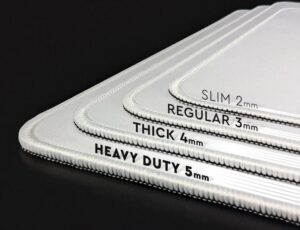
Thin pads (1–2 mm): Offer the closest feel to the desk, which many gamers prefer for precise control and reduced lift-off. They are portable and easy to clean but provide less cushioning for the wrist.
Medium thickness (2–4 mm): A balanced choice that accommodates some cushioning without lifting the mouse too much. Suitable for a wide audience, from productivity to gaming.
Thick pads (4–6 mm or more): Provide noticeable wrist support and can reduce fatigue during long sessions. However, they raise the surface, potentially altering aiming or cursor lift-off for some players. If you have a standing desk or a higher chair, test for shoulder and neck comfort as well.
Size matters
Small to medium (about 8–12 inches wide): Great for compact setups, laptops, or travel. They’re easy to store but may constrain larger mouse movements during intense gaming.
Large pads (14 inches and up): Offer ample room for wide arcs and dual-monitor setups. They’re ideal for gamers who rely on big, fluid motions and for desk setups that prioritize consistency across multiple tasks.
Desk mats: If you’re aiming for a cohesive look and extra desk coverage, consider a larger desk mat that covers both the keyboard and mouse area. It can unify aesthetics and protect the surface beneath.

Texture and grip
Surface texture affects feedback: rougher textures provide more grip and tactile feedback, smoother textures enable faster, gliding movements. If you’re using a high-precision sensor, seek a surface with stable lift-off and consistent tracking.
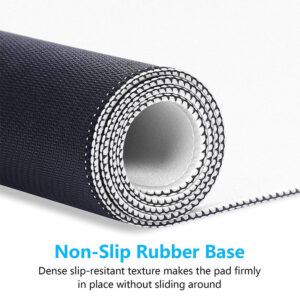
Non-slip bases: A reliable non-slip base prevents creeping or sliding on slick desks. Look for bases with a rubberized or grippy underside, especially if you have a glass or polished wood surface.
Durability and maintenance
Stain resistance and easy cleaning extend life. Dark surfaces or fabrics designed to resist oils can help keep glide consistent between cleanings.
Edge finishing: Reinforced edges reduce fraying, which matters if you frequently slide the mouse at the boundaries of the pad or move it vigorously.
Aesthetics and compatibility
Color, pattern, and thickness can complement your workspace. Some pads offer RGB lighting, which can be fun for gaming rigs, but prioritize performance over appearance if you’re unsure.
Compatibility with your mouse sensor is key. Most modern mice perform well on fabric and hard pads, but high-DPI players may notice differences in lift-off distance and tracking stability.
In 2026, the perfect mouse pad is the one that harmonizes your workflow with comfort and precision. Assess surface type, thickness, size, texture, and maintenance needs, then test a few options if possible. Your posture, accuracy, and endurance will thank you as you glide through work and play with confidence.

