
When it comes to creative work—especially for designers, architects, and CAD professionals—precision and comfort can make a world of difference. While most people think of high-end mice, powerful computers, and ergonomic chairs, one essential but often overlooked accessory is the mouse pad. The right mouse pad can drastically improve accuracy, wrist comfort, and overall workflow efficiency.
In this blog, we’ll explore the top mouse pads for designers and CAD professionals, taking into account surface quality, size, durability, and ergonomic features.
Why the Right Mouse Pad Matters
Before diving into the best options, it’s important to understand why a high-quality mouse pad is essential for professional design work:
Precision: Design and CAD software require pixel-perfect accuracy. A smooth, responsive surface ensures your mouse movements translate accurately to the screen.
Comfort: Long hours of designing can lead to wrist strain or fatigue. Ergonomic pads with wrist support help alleviate this.
Durability: Frequent use demands a mouse pad that stands the test of time without fraying or losing surface quality.
Size and Space: Larger pads provide ample room for sweeping motions, useful in large-scale modeling or editing tasks.
Top Mouse Pads for Designers and CAD Professionals
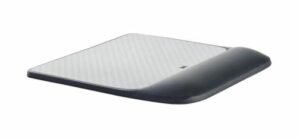
- 3M Precise Mouse Pad with Gel Wrist Rest
Best for Ergonomics
Surface: Micro-textured for optical and laser mice
Size: Medium (9" x 8.5")
Features: Gel-filled wrist rest, antimicrobial protection
This mouse pad is a favorite among professionals who spend extensive hours in front of their screens. The gel wrist rest reduces pressure and helps maintain a neutral wrist position, making it ideal for preventing strain during long design sessions.
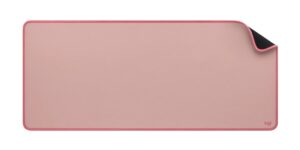
- Logitech Studio Series Desk Mat
Best for Aesthetic and Workspace Organization
Surface: Soft cloth with anti-slip base
Size: Extended (30" x 15.75")
Features: Spill-resistant, minimalist design
If you prefer a clean, minimal desk setup, this extended desk mat doubles as both a mouse pad and a base for your keyboard and other tools. It’s great for large desk spaces and offers a smooth glide while protecting your desk from scratches.
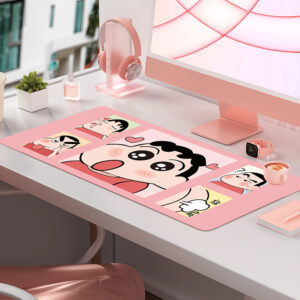
- MEIYEE 3XL Extended Gaming Mouse Pad
Best for Multi-Monitor and Large Workspaces
Surface: Smooth cloth
Size: Extra Large (48" x 24")
Features: Stitched edges, machine-washable
Designers using ultrawide or dual-monitor setups will appreciate the real estate this pad provides. The surface is consistent across the entire mat, allowing for uninterrupted work whether you’re using a mouse, stylus, or even moving a sketchpad around.
What to Consider When Choosing a Mouse Pad
-
Surface Texture
Opt for a smooth or micro-textured surface compatible with your mouse type. Laser and optical sensors perform best on consistent, low-friction pads. -
Size
Larger pads offer more freedom of movement—ideal for wide-screen or multi-monitor setups. Extended pads can also double as desk protectors. -
Material
Cloth is flexible and portable, while hard plastic or aluminum offers more durability and speed. Choose based on your preference for control or glide. -
Ergonomics
If you suffer from wrist pain or carpal tunnel syndrome, a pad with gel or memory foam wrist support can make all the difference. -
Aesthetic and Build Quality
Designers often appreciate a neat, clean workspace. Stitched edges, color options, and spill resistance are small features that make a big impact over time.
Final Thoughts
A high-quality mouse pad is more than just a surface—it’s an essential tool that enhances your workflow, comfort, and precision. Whether you're a graphic designer creating digital illustrations or a CAD professional modeling 3D structures, the right mouse pad can improve your accuracy, reduce fatigue, and even protect your workspace.
While all the options listed above are excellent in their own right, the best mouse pad for you depends on your specific working style, desk space, and ergonomic needs. Investing in a well-designed mouse pad might seem minor, but for professionals who rely on accuracy and comfort, it’s a small change with big benefits.

