
In competitive gaming, your aiming and control are influenced by more than just your mouse or monitor. One often-overlooked factor is the mouse pad surface. Although it may seem like a basic accessory, the material and texture of a mouse pad can directly affect tracking accuracy, movement speed, and overall precision—especially in fast, accuracy-driven games like FPS titles (e.g., Valorant/CS), RTS games, or battle royale games.

The Importance of a Mouse Pad in Gaming
A mouse pad acts as the interface between your mouse sensor and the desk surface beneath it. Its job is to provide a consistent texture so the sensor—optical or laser—can accurately detect motion. For gamers, consistent tracking means smoother cursor movement and more reliable aiming, which can make a real difference during quick flicks, slow corrections, or long tracking sessions.
Types of Mouse Pad Surfaces
Mouse pads mainly come in two surface categories: cloth (soft) pads and hard pads.
1) Cloth Mouse Pads
Cloth pads are made from fabric layers (usually on top of a rubber base). They tend to have higher friction, which many players prefer because it improves control.
Pros:
- Better precision and stability: Especially helpful for players who use lower sensitivity and rely on controlled, sweeping movements.
- Comfort for long sessions: The surface feels softer under the wrist and forearm.
- Portable and easy to store: Many cloth mats roll up conveniently.
Cons:
- Slower glide: Extra friction can make rapid “flick” movements feel harder.
- Wear over time: Fabric may absorb sweat or dirt and gradually change performance.
2) Hard Mouse Pads
Hard pads are typically made from plastic, aluminum, or glass. They offer a low-friction surface that allows faster movement.
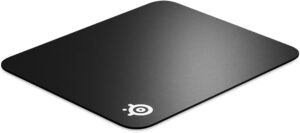
Pros:
- More speed: Great for high-DPI players or those who rely on quick reflex shots.
- Durability and easy cleaning: Hard surfaces usually hold up well and wipe clean easily.
- Consistent surface behavior: Less variation during use compared to worn fabric.
Cons:
- Less control: The slickness can make fine micro-adjustments more difficult.
- Comfort trade-offs: Some players find hard pads less comfortable during long gaming sessions.
How Texture Affects Sensor Tracking
Even with advanced sensors, the mouse still “reads” the surface texture to detect movement. If a surface is too smooth, too glossy, or uneven, it can cause jitter or inconsistent tracking—especially with optical sensors.
- Fine textures (common on cloth pads) usually support more accurate tracking.
- Glossier or coarse surfaces may increase the chance of small tracking errors.
- Finding the Right Balance: Speed vs. Control
- Different surfaces create a different feel between speed and precision:
- Speed-oriented pads support quick movement and fast flicks.
- Control-oriented pads add resistance that helps users make stable corrections and maintain accuracy.
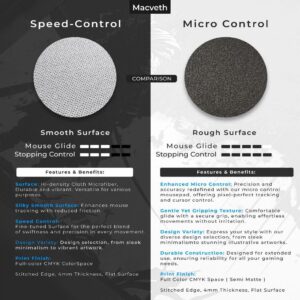
Many brands now offer hybrid surfaces designed to provide a balanced glide for both styles.
Final Tip: Don’t Forget Size and Thickness
Finally, the mouse pad’s size and thickness also matter. Larger pads support wider arm movements (helpful for low sensitivity). Thicker mats can reduce fatigue and improve comfort—especially during long sessions.

